

Introduction
Most “SEO automation platform” roundups list a dozen tools. They don't tell you which ones actually work together.
I tested this differently. I ran each platform through one workflow: pull Search Console data in, find the gaps, publish a page, check if it ranked.
Short version: every platform here automates a slice of SEO well. Almost none automate the loop.
Surfer optimizes a draft. It can't tell you which page to write. seocluster.ai clusters your GSC queries, then stops before drafting. Search Atlas gets closest to a full workspace, but it has no cluster gap engine and no local page matrix.
If your team is stitching three or four of these together, the reviews below show what you're paying for, and what gap is left.
Every rating comes from the same test: connect a live site with real Search Console history, ask the platform to find missing pages, produce a draft, track the result.
What an SEO automation platform should actually do
Before the reviews, here's the scorecard I used. A real platform, not just a point tool, should cover five stages:
- Data in. Native Google Search Console integration. Decisions run on your real impressions and positions, not third-party estimates.
- Gap detection. Turn that query data into topic clusters. Surface the pages you're missing.
- Trend signals. Show which pages are rising or falling. Short-window trends, not a 12-month average, so you refresh the right ones.
- Drafting. AI drafts and briefs tied to your actual cluster and query data, not a generic prompt.
- Scale and publish. Programmatic or local page generation (service x location matrices) and workflow automation (API, n8n) to push pages live.
Each review below scores the tool on these five stages. Most cover one or two.
1. SEO Content Machine (SCM): the integrated AI SEO workspace
Best for: SEO pros and agencies who want the whole loop in one place. Covers: all five stages.
Full disclosure, I built this one. Judge it against the same five-stage test as everything else.
- Data in. Native GSC import. Every query, page, impression, and position for your property becomes workspace data.
- Gap detection. The topic cluster engine builds clusters from your real queries plus SERP research, and flags the pages you don't have.
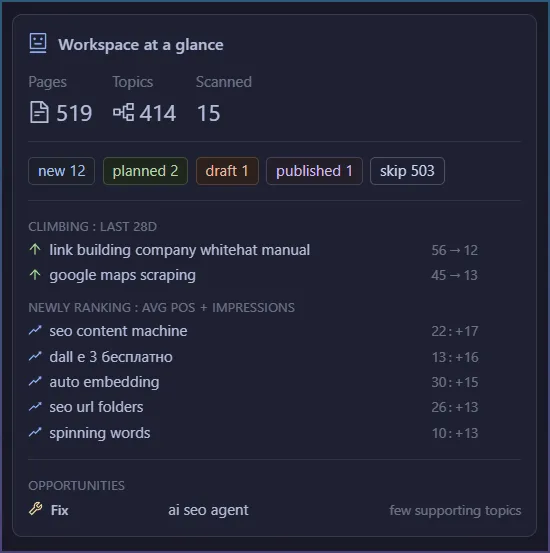
- Trend signals. 14-day rising/falling impression trends per page. Refresh decisions come from movement, not gut feel.
- Drafting. The AI agent writes briefs and drafts tied to the specific cluster and the queries the page already gets impressions for.
- Scale and publish. A local SEO matrix builder generates service x location page plans. n8n/API automation handles publishing.
Honest gaps: no rank tracker beyond GSC's own positions. No backlink data. No Google Business Profile management. If those matter to your workflow, you'll still pair SCM with a tracker.
Verdict: the only platform here where GSC data, gap detection, drafting, and programmatic pages live in one workspace instead of four subscriptions.
GSC based metrics.
2. Search Atlas: the closest thing to a full suite
Best for: agencies wanting rank tracking, content tools, and GSC data under one login. Covers: data in, drafting, partial trend signals.
Search Atlas is the strongest competitor on this list. It connects to GSC. It includes a content editor with AI writing (OTTO), rank tracking, and site auditing. For an agency replacing Ahrefs plus a writing tool, that's a real consolidation play.
Here's where it stopped in my test. There's no topic cluster gap engine driven by your GSC queries. It optimizes the pages you tell it about, but “which pages am I missing” is still manual keyword research. There's also no local SEO matrix builder for service x location plans. Multi-location work means building pages one at a time, or exporting to another tool.
Verdict: excellent breadth. But the discovery half of the loop, from your data to your missing pages, isn't automated.
3. Surfer SEO: on-page optimization, not a platform
Best for: optimizing individual drafts against the live SERP. Covers: drafting (optimization half only).
Surfer is still the best-known name in AI content optimization. Its content editor scores a draft against top-ranking competitors in real time. Surfer AI writes full articles from a SERP-derived outline. For making one page more competitive, it works.
Here's what it doesn't do. Surfer has no native GSC-driven planning. It can't look at your property and tell you which pages to write or refresh. You bring the keyword, it optimizes the page. No trend signals. No cluster gap detection. No programmatic or local page generation. In the five-stage test, it's a stage-4 specialist.
Verdict: a strong point tool that assumes you already did the strategy somewhere else.
4. seocluster.ai: clustering without the follow-through
Best for: understanding what your GSC queries mean. Covers: data in, gap detection (partial).
seocluster.ai does one interesting thing. It pulls your Search Console queries and clusters them by intent. That surfaces themes you didn't know your site was ranking for. It's a real piece of the loop, and the same starting point an integrated workspace uses.
Then it stops. No drafting. No briefs. No local matrix. No publishing automation. The output is analysis you carry into other tools. In my test the clusters were useful as research, but every action they implied (write this page, refresh that one) happened outside the product.
Verdict: it proves GSC-driven clustering is the right starting point. It also proves clustering alone isn't a platform.
5. Alli AI: automated on-page changes at scale
Best for: bulk technical and on-page edits across large sites. Covers: scale and publish (on-page slice only).
Alli AI's pitch is site-wide automation. It injects title, meta, schema, and content changes across thousands of pages through one snippet, no developer wait. For agencies managing big legacy sites, that deployment mechanism is genuinely useful.
Here's what it isn't. Alli doesn't build topic clusters. It doesn't detect missing pages. Its suggestions are rule-based on-page fixes, not strategy from your search data. It automates execution of changes, not the decision about what content should exist.
Verdict: deployment muscle paired with someone else's brain. Useful in a stack, not a stack replacement.
6. Frase and MarketMuse: brief builders for content teams
Best for: editorial teams that live on content briefs. Covers: drafting (brief half).
Frase and MarketMuse solve the same problem at different price points. Both turn a target keyword into a research-backed brief. Frase compiles SERP research into outlines quickly and cheaply. MarketMuse adds a content inventory and topic authority scoring, at enterprise pricing.
Both share the same boundary. Planning starts from a keyword you supply, not your Search Console reality. MarketMuse's inventory gets partway to gap detection, but it's driven by its own topic model, not your live impression data. Neither has trend signals, local page generation, or publishing automation.
Verdict: good brief factories. The strategy layer and the publishing layer are still your job.
7. n8n + custom agents: the DIY route
Best for: technical teams who want full control. Covers: any stage you're willing to build.
A lot of “AI SEO agent” content right now is tutorials for wiring your own agent in n8n or code. GSC API in, LLM in the middle, CMS API out. I tested a representative build. It works, and it's fully yours.
Here's the honest cost. The GSC OAuth and data-handling plumbing alone took the better part of a day. Clustering quality depends entirely on your prompt engineering. Every workflow, trends, briefs, local pages, is another build. Maintenance is forever. The tutorials treat GSC integration as a hard engineering problem because, done from scratch, it is.
Verdict: the right choice if automation is your product. If SEO output is your product, you're rebuilding a workspace that already exists.
Verdict: platforms vs point tools
| Platform | GSC data in | Cluster gap detection | Trend signals | AI drafts from your data | Local/programmatic pages |
|---|---|---|---|---|---|
| SEO Content Machine | Yes | Yes | Yes (14-day) | Yes | Yes |
| Search Atlas | Yes | No | Partial | Yes | No |
| Surfer SEO | No | No | No | Yes (SERP-based) | No |
| seocluster.ai | Yes | Partial | No | No | No |
| Alli AI | No | No | No | No | On-page only |
| Frase / MarketMuse | No | Partial (MM) | No | Briefs | No |
| n8n custom | Build it | Build it | Build it | Build it | Build it |
If you only need one piece, buy the point tool that's best at it. Surfer for on-page. Alli for bulk edits. Frase for briefs.
But if you want the whole loop, data in, gaps found, drafts written, pages shipped, results measured, the table above only has one row with five yeses. That's the gap I kept running into. It's why I built SCM as a workspace instead of another point tool.
If you want to see how SCM fits into your workflow, connect your Search Console property and see what your own data says you're missing. Start your trial