
In the previous article (How to Build a Keyword Clustering System with Embeddings and Density Clustering) I went over the new topic clustering system for SEO Content Machine.
The next step is not just turning clusters into content.
It is turning clusters into structured page pipelines.
In the old version of SCM, keywords and AI templates were completely disconnected. You had to manually pick a template, usually ending up with one oversized prompt trying to handle everything.
That does not scale.
Now the system connects:
topic → cluster → intent groups → page types → AI templates
This is not just classification. It is page planning.
The Problem With Raw Topic Clusters
Keyword tools even with cluster, usually stop at grouping keywords.
Example cluster:
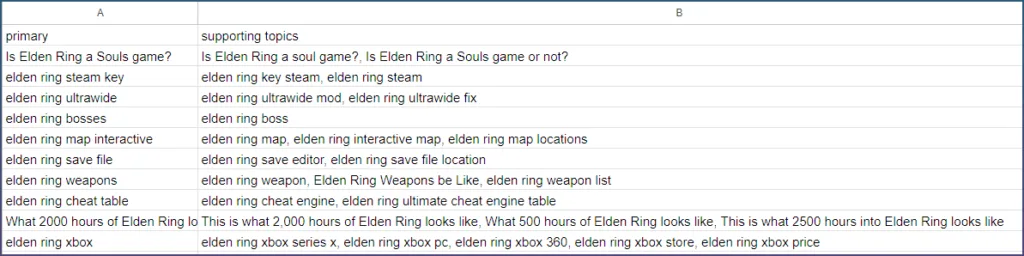
Keyword
“Is Elden Ring a Souls game?”
“elden ring ultrawide”
“elden ring bosses”
This looks useful, but it is incomplete.
You still do not know:
- how many pages to create
- what type each page should be
- which keywords belong to which page
The missing step is structure inside the cluster.
Clusters are not one page.
They are multiple intents mixed together.
The SCM Topic Cluster System
Instead of assigning one template per cluster, the system does this:
- Split cluster into intent groups
- Decide which intents deserve pages
- Build pages per intent
- Detect page type using keyword signals
- Map page type to template
- Merge duplicate page types
- Attach supporting topics
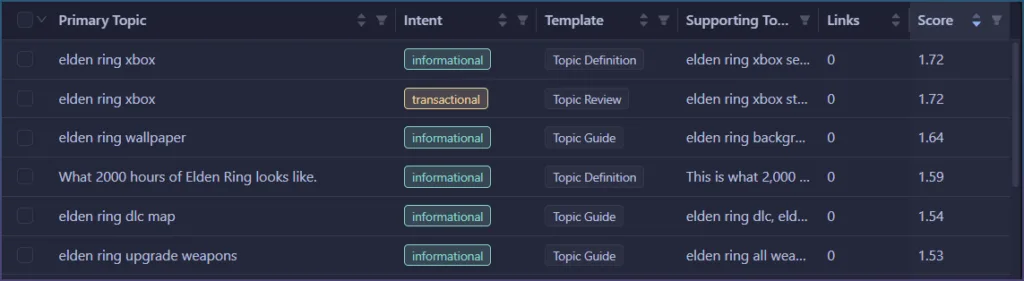
So one cluster can generate multiple pages.
Not just one.
This is a big shift.
Step 1: Intent Splitting Inside Clusters
Each topic is first classified into:
- informational
- commercial
- transactional
- navigational
This is the first thing that needs to be done before assigning AI templates.
Pages are created per intent group, not per cluster.
ie: The same primary topic, can be used to create multiple different pages.

There are some hidden rules to make intents are assigned intelligently:
- navigational is ignored
- informational needs at least 2 topics
- commercial can pass with 1
- transactional always allowed
Step 2: Cluster Tier Changes Behavior
Think of clusters like different types of topics on a website.
Not all topics should be treated the same.
Some are big and messy.
Some are super focused.
Some sit in the middle.
So the system labels each cluster as one of three types:
- pillar → big, broad topic
- standard → normal topic
- leaf → very specific topic
How it decides
It looks at two things:
- How similar the keywords are to each other (cohesion)
- How connected the cluster is to other clusters (connectivity)
Simple way to think about it:
- Low similarity + lots of connections → pillar
- Very high similarity → leaf
- Everything else → standard
What this actually means
Pillar = big messy topic
These are broad topics that connect to many others.
Example:
“email marketing”
This could include:
- tools
- strategies
- tutorials
- comparisons
So instead of guessing, the system forces it into a:
→ guide page
Because guides handle broad topics best.
Leaf = super specific topic
These are tight, focused clusters where everything is basically the same idea.
Example:
“what is double opt in email”
There is not much to expand into.
So if no strong signal is found, it defaults to:
→ definition page
Short, direct, to the point.
Standard = everything in between
Most clusters fall here.
These rely on keyword signals to decide the page type.
Why this matters
Without this step, everything is treated the same.
That leads to:
- forcing big topics into narrow pages
- over expanding tiny topics into long articles
This fixes that.
The system adjusts the page type based on how big and connected the topic is, not just the words inside it.
Simple mental model
- Pillar → explain everything
- Standard → follow keyword intent
- Leaf → answer quickly
So now it is not just:
keyword → page
It is:
topic size + structure → page strategy
Step 3: Page Type Detection (Actual Logic)
This is where most systems get it wrong.
This is not simple pattern matching.
It is a 2 stage system with fallback.
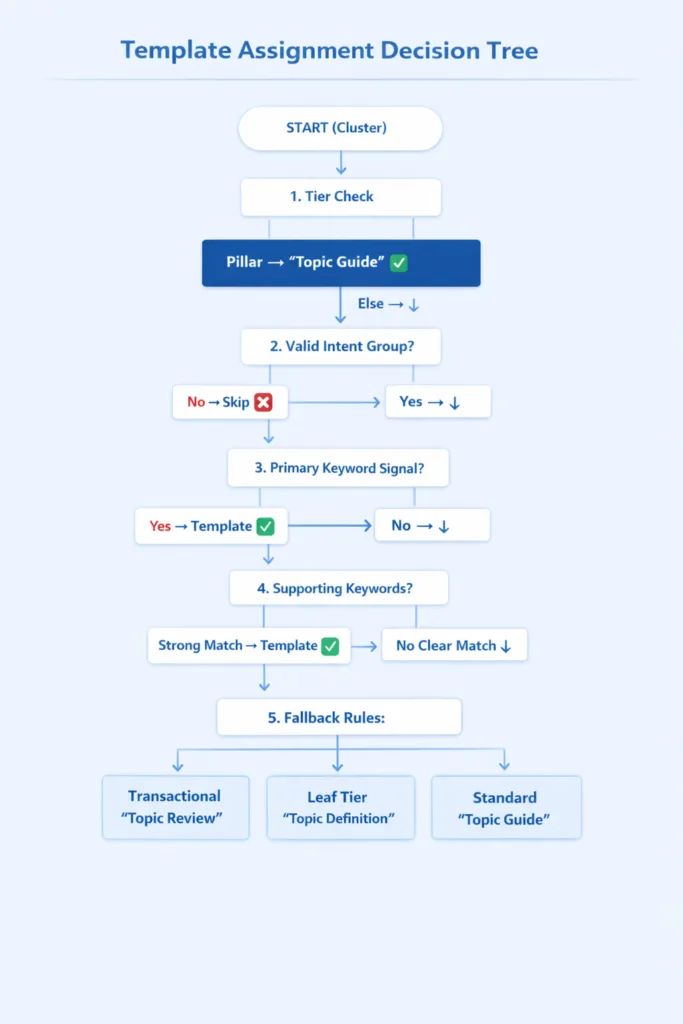
Stage 1: Primary Topic Override
If the cluster name itself contains hardcoded match, it wins immediately.
Example:
“list of leather cleaner”
→ instantly becomes listicle
Stage 2: Supporting Topic Scoring
If we can't find a match in the topic name:
- look at supporting topics
- score based on matches to a list of words
We look at sub topics and where it matches a keyword list, it gets a score.
The Actual Page Types (Internal)
The system does not use the original 7 labels directly.
Internally it uses:
- definition
- how_to
- guide
- troubleshooting
- comparison
- listicle
- review
These are stricter and map better to signals.
Step 4: Template Mapping
Only after page type is decided:
definition → Topic Definition
how_to → Topic How To
guide → Topic Guide
troubleshooting → Topic Troubleshoot
comparison → Topic Comparison
listicle → Topic Listicle
review → Topic Review
We map our page types automatically to pre-built AI templates.
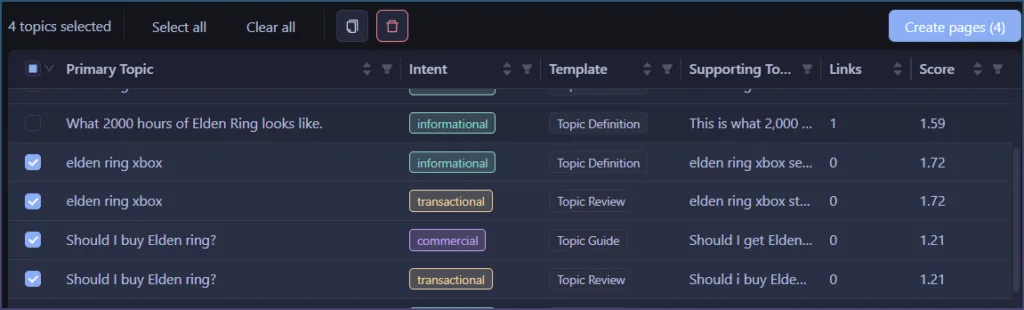
Step 5: Multiple Pages Per Cluster
Each cluster can create more than one page.
Reason: one cluster can contain multiple search intents.
SCM groups cluster topics by intent:
- informational
- commercial
- transactional
- navigational
Then each usable intent group can create a page.
Example output:
- informational -> guide page
- commercial -> listicle or review page
- transactional -> review page
So one cluster can produce 2 or 3 page briefs instead of one generic page.
Navigational intent is ignored for page creation. It is usually brand, login, official site, docs, marketplace, or social destination intent. Those queries do not make good generated content pages.
Example “clean leather shoes”
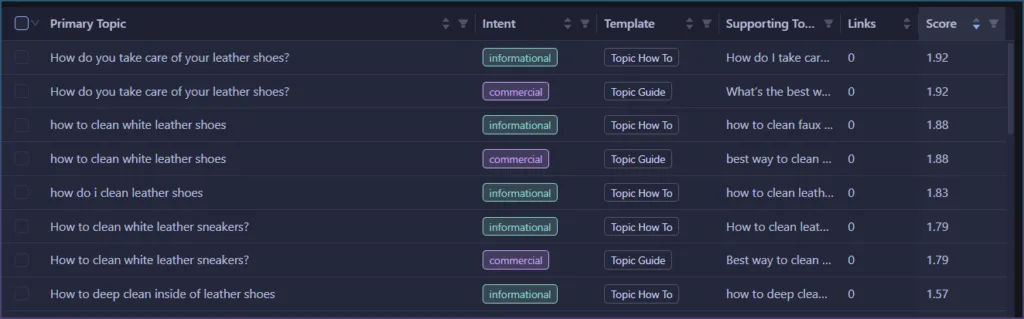
Step 6: Deduplication and Merging
Each generated page is built from:
- primary topic
- supporting topics
Primary topic is cluster name. SCM picks cluster name from topic closest to embedding centroid.
Supporting topics come from same intent group inside same cluster.
Supporting topics:
- exclude exact match of primary topic
- stay tied to same semantic cluster
- provide headings, subsections, and expansion points
- become prompt context for Article Creator
Example:
Primary topic:
clean leather shoes
Informational supporting topics:
- how to clean leather shoes
- clean white leather shoes
- clean leather shoes without damaging them
- leather shoe cleaning tips
Commercial supporting topics:
- best leather shoe cleaner
- leather shoe cleaner comparison
- leather shoe cleaner alternatives
Transactional supporting topics:
- where to buy leather shoe cleaner
- leather shoe cleaner coupon
- leather shoe cleaner in stock
This is what turns clustering into usable briefs. Cluster gives topic boundary. Intent group gives page role. Supporting topics give page structure.
Step 7: Supporting Topics
Each page is built from:
- primary topic (cluster name)
- supporting topics (filtered)
Supporting topics:
- exclude exact match of primary
- must relate to the same root
These become:
- headings
- sub sections
- expansion points
This is what turns clusters into usable briefs.
Step 8: Slug Generation
Slug is based on:
- primary topic
- page type suffix when cluster creates multiple pages
Examples:
clean-leather-shoesclean-leather-shoes-guideclean-leather-shoes-reviewclean-leather-shoes-comparison
If only one page exists for cluster, SCM keeps clean base slug:
clean-leather-shoes
If multiple pages exist, suffix keeps URLs distinct:
- guide:
-guide - how_to:
-how-to - troubleshooting:
-troubleshooting - comparison:
-comparison - listicle:
-listicle - review:
-review - definition: no suffix
SCM also avoids double suffix. If primary topic already ends with page type suffix, it does not add same suffix again.
How This Fits Into the Full Pipeline
Template assignment is final structure step.
Full flow:
- Embed topics
- Cluster with density clustering
- Label cluster by centroid topic
- Rank by cohesion
- Filter low quality clusters
- Build inter-cluster links
- Assign AI templates
- User selects pages
- Create Article Creator task
Important:
Template assignment is last, after structure is known.
Not before.
Reason: template choice needs cluster tier, intent groups, supporting topics, and duplicate page-type merge.
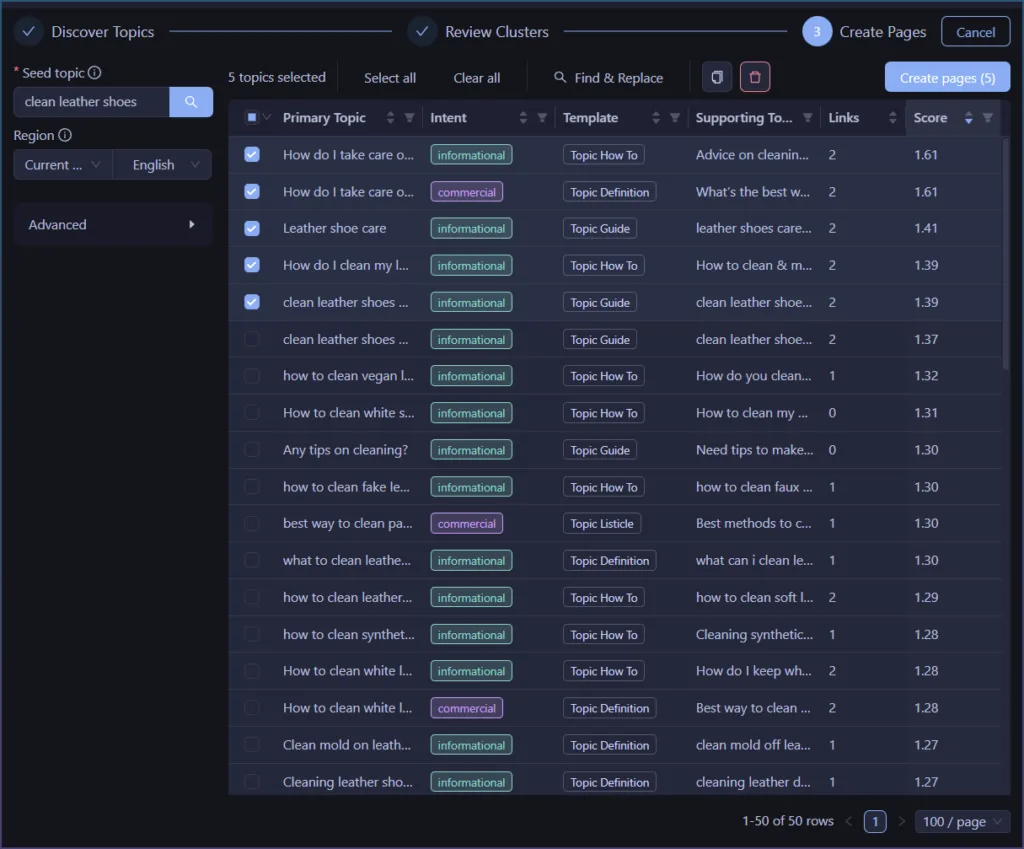
Why This Is Better Than Simple Classification
Most systems do:
keyword -> intent -> template
SCM PageFlow does:
cluster -> intent groups -> pages -> page type -> template
That gives:
- multiple pages per cluster
- stronger intent alignment
- less noise from individual keywords
- automatic content architecture
- cleaner URL structure
- useful briefs instead of keyword dumps
It is closer to how real sites are structured.
One cluster is not always one page. One cluster is one topical area. That topical area can contain guide, comparison, listicle, and review needs.
What You Actually Get
Instead of:
cluster of keywords
You get:
- multiple pages per cluster
- each page with clear role
- each page with supporting topics
- each page mapped to AI template
- each page deduplicated by page type
- each page with slug
- each selected page passed to Article Creator
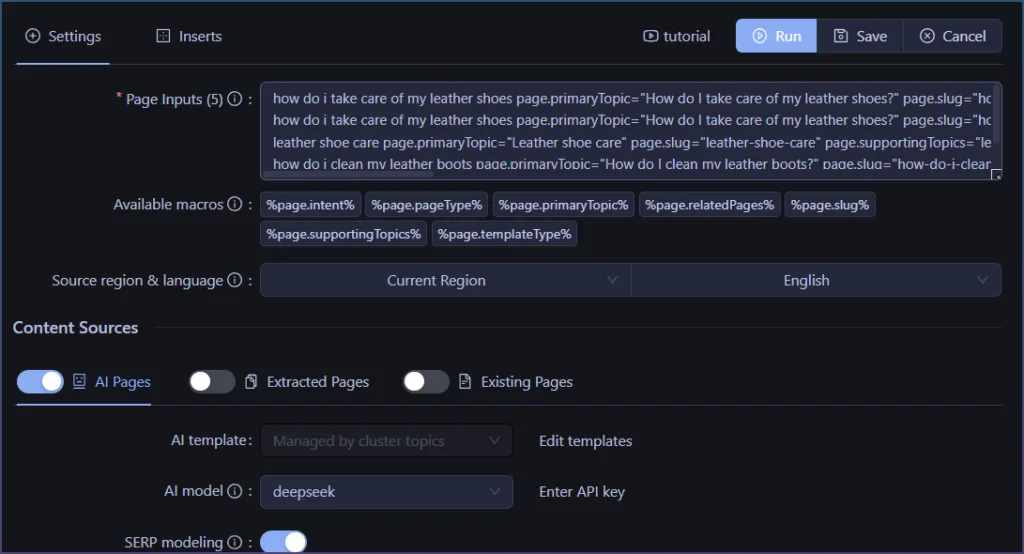
When user clicks Create pages, SCM writes selected page briefs into Article Creator input.
Each generated input line includes:
- page primary topic
- page slug
- supporting topics
- intent
- page type
- template type
- related page slugs
This is no longer clustering.
It is content system generation.